Crack the Code: turning addition drills into a decoding game
July 21, 2026 · 6 min read
Secret-code math worksheets aren't a new format — a quick search turns up plenty. Almost all of them share one design choice worth knowing about before picking one: the code key is fixed. The same icon means the same digit on every sheet, forever. That one detail changes what the worksheet is actually testing.
How the cipher actually works
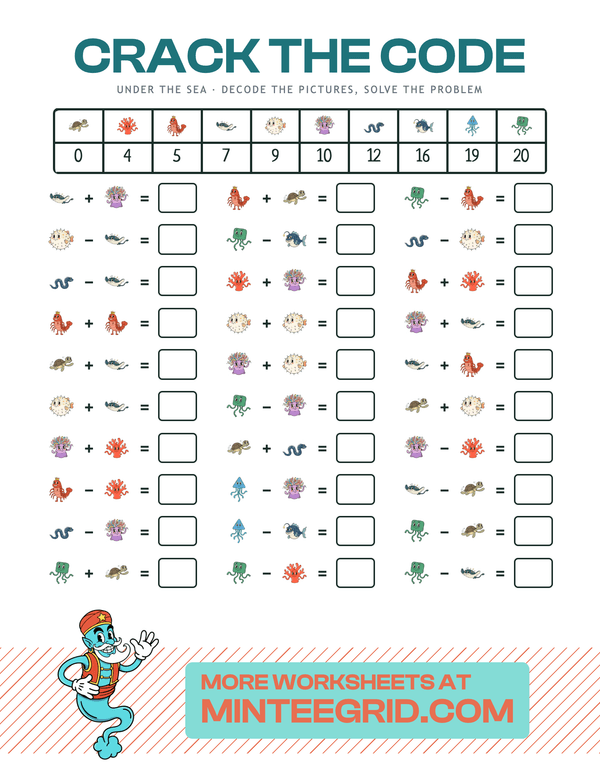
Every Crack the Code sheet starts with a legend: ten themed icons, each assigned a digit. Every problem below it is written entirely in icons — an icon plus an icon, an equals sign, and a blank square to fill in. Solving a problem means two separate steps, not one:
- Decode — look up each icon in the legend to find the number it stands for.
- Solve — do the actual addition or subtraction on the numbers just decoded, and write the answer.
Skip step one, or do it from memory instead of by actually checking the legend, and step two is being practiced on the wrong numbers.
Why a fixed key is the weaker version of this idea
If the same icon always means the same digit, sheet after sheet, a kid who's done a handful of them starts recognizing symbols by sight — "that one's always 7" — without ever consulting the legend again. At that point the sheet has quietly turned into a plain addition worksheet wearing a costume: the decoding step, which is the actual novel skill here, has been skipped entirely.
MinteeGrid's cipher reassigns which icon maps to which digit on every sheet generated. Two settings control exactly how:
- Sequential — the ten icons get 0 through 9 in order, always. Predictable and gentle, a good starting point for a first sheet, but the pattern itself can be picked up after a couple of tries.
- Random — the icon-to-digit mapping is shuffled fresh, with no pattern to lean on. The legend has to be read and used on every single problem, every time — which is the version that actually forces decoding rather than recognition.
Lifehack: for the random setting, have the kid copy the legend onto scratch paper first, in whatever order feels easiest to scan — then cross off each icon's digit as it gets used. It turns "hunting the legend for every problem" into a quick lookup, and makes it obvious at a glance which symbols have already been decoded correctly.
Picking difficulty for Crack the Code

Three settings interact, and it's worth tuning them one at a time rather than guessing at a combination:
- Operations — addition only, subtraction only, or mixed. Mixed is the hardest, since it adds "which operation is this" as a decision on top of decoding and solving.
- Code assignment — sequential (easier, patterned) versus random (harder, no shortcut). See above.
- Max number — how large the numbers in each problem can get, and on random assignment, how wide the pool the code values themselves are drawn from.
A sensible ramp for a first-time user: addition only, sequential, low max number — then relax one setting at a time as the sheet starts finishing with confident, correct answers. The same first-three-answers signal that works for every other generator applies here too: a long pause on problem one usually means too many settings got bumped up at once.
Try it yourself
Crack the Code
Decode the icons, solve the problem. Logic · 6–8 years.
Once the code is second nature
A kid who's fluent at decoding addition and subtraction problems this way already has the core skill multiplication drilling depends on — reading a symbol, converting it to a value, and computing with it. The multiplication facts guide is a natural next stop once single-digit addition and subtraction are solid, whether that's through Crack the Code or any other route.
FAQ
What is a 'crack the code' math worksheet?
A worksheet where a legend assigns each digit (0–9, or a wider range) to a small icon, and every problem is written using icons instead of numbers. Solving a problem means first decoding the icons into numbers using the legend, then doing the actual addition or subtraction.
Why does the code key reset every sheet instead of staying the same?
A fixed key — the same icon always means the same digit — can be memorized after a few sheets, at which point a kid is recognizing symbols from memory instead of decoding them, and the exercise stops testing what it's supposed to. Reassigning the icon-to-number key on every sheet (the "random" setting) means the legend has to actually be read and used each time, no shortcut available.
What's the difference between 'sequential' and 'random' code assignment?
Sequential hands out 0 through 9 in a fixed increasing order — an easier ramp for a first sheet, since the pattern itself is predictable. Random draws 10 distinct values in any order (and, at a higher max-number setting, can include two-digit values), which removes the pattern and forces each symbol to be looked up individually.
Does raising the 'max number' setting make the problems or the code harder?
Both, but for different reasons. It widens the range of numbers the addition/subtraction problems can use, and — on the random setting — it also widens the pool the cipher's own values are drawn from, which can push some code values into two digits instead of staying single-digit throughout.
What age is Crack the Code appropriate for?
Roughly grades 1–2 (ages 6–8) for a first pass with sequential assignment and addition only. Random assignment and mixed addition/subtraction are a natural next step once the basic decode-then-solve routine is comfortable.